My Proxmox AI Agent
Published: March 2026
Now that I have a Local AI with Ollama I thought it would be helpful to have a way to interact with an AI agent that can handle operational tasks in my Proxmox environment. I built a Proxmox AI agent to handle simple day-to-day tasks like starting, stopping, rebooting my VMs LXC containers, straight from Telegram or Slack. It also monitors the whole cluster in real time and alerts me when something runs hot. The code and full setup instructions are in my GitHub repo.
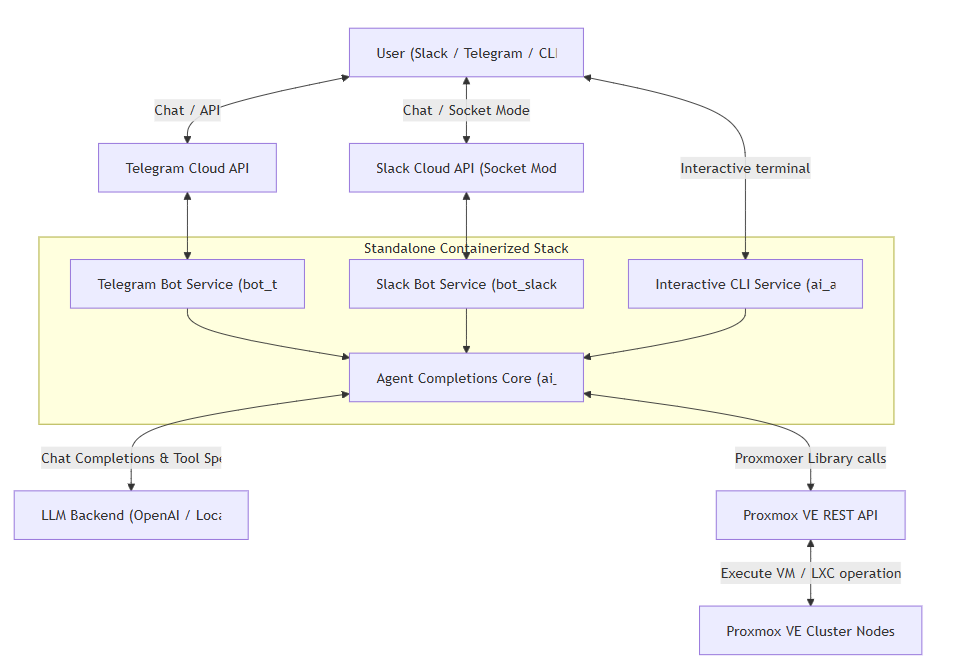
Architecture
proxmox-ai-agent/
├── ai_agent.py          # agent core: LLM tool-calling loop + Proxmox tools
├── bot_slack.py         # Slack frontend (Socket Mode)
├── bot_telegram.py      # Telegram frontend
├── monitor.py           # standalone resource monitor + alerts
├── memory.md            # my cluster layout: names, aliases, VMIDs (not in repo)
├── docker-compose.yml   # slack-bot, telegram-bot, monitor, agent-cli services
├── Dockerfile
├── env.example          # Proxmox / LLM / bot credentials template
└── requirements.txt
The key design point: both backends use the exact same Python script and the same set of API tools - create_vm, start_vm, stop_vm, reboot_vm, reset_vm, list_vms. Whether I point it at my local Qwen model or at OpenAI, only the .env file changes - nothing in the code.
What It Can Do
- Execute natural-language commands from Telegram or Slack: reboot joplin-server, stop jenkins, restart fileserver
- Name resolution: translates guest names and aliases (even typos) to the right VMID and node using an embedded memory.md context file
- LXC/QEMU auto-detection: checks the guest type via cluster resources so it always calls the correct API endpoint - no wrong-endpoint errors
- Real-time monitoring: a standalone monitor polls CPU, memory, and disk for every node, VM, and container, and alerts Slack and Telegram when usage crosses 80%. Hysteresis prevents alert spam - it only re-alerts if things get meaningfully worse, and sends a “resolved” message once usage drops back down
Telegram & Slack Integration
Same agent core, two chat front-ends - I can manage the cluster from my Telegram or Slack channel:
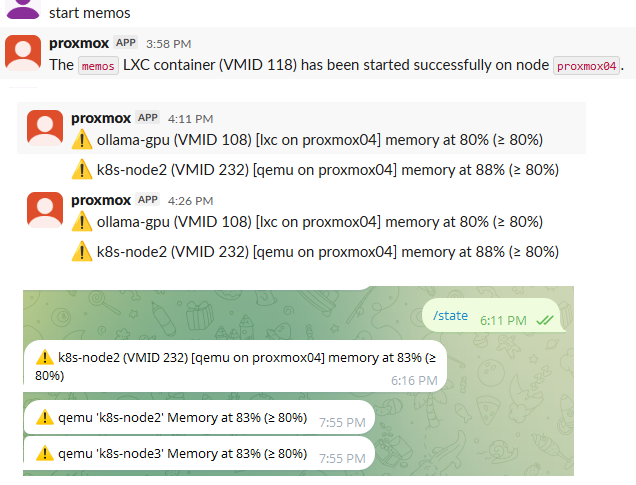
Telegram - private bot, restricted to my user ID
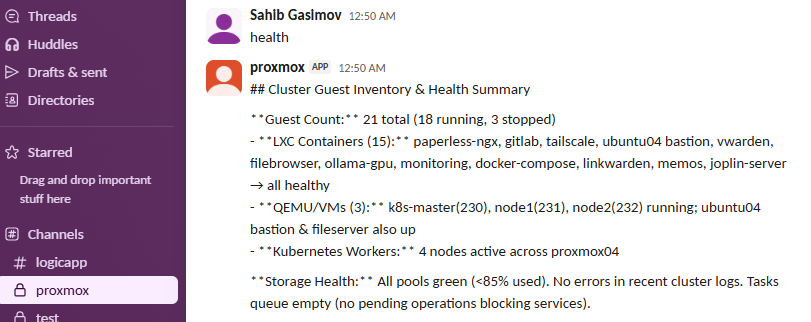
Slack - Socket Mode bot in a team channel
Interactive CLI Mode
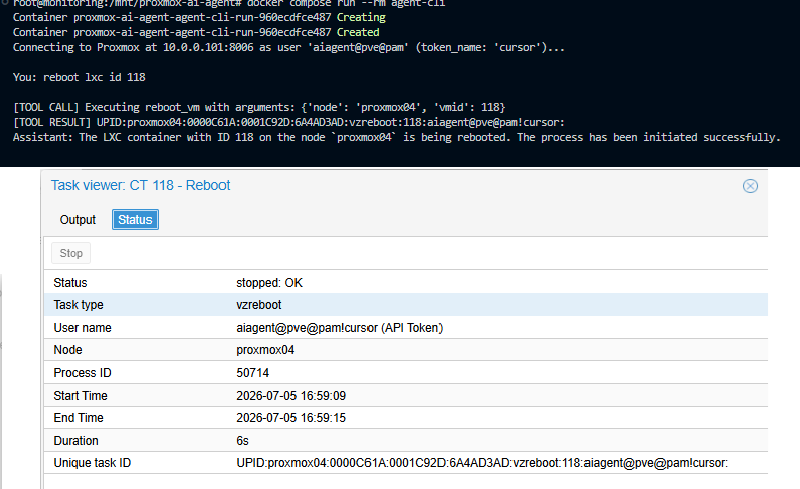
Besides the chat bots, the agent also runs as an interactive CLI - handy for testing new tools or working directly on the box: docker compose run --rm agent-cli
Local LLM vs OpenAI
The local backend is the same Ollama stack from my Local AI article, running on 12 GB of VRAM. I tested phi4:14b, qwen3.5:9b, qwen2.5:9b, and qwen2.5-coder:7b - all of them had some trouble following instructions, and I ended up settling on qwen2.5-coder:7b as the most reliable of the bunch.
Of course testing with large cloud models they are able to strictly follow system prompts and markdown rules (safety policies, confirmation requirements, LXC vs QEMU differentiation) without getting confused or taking shortcuts. When an API call fails, they're also much better at diagnosing the problem, recognizing a VM lock, checking task status logs and recommending or executing a recovery step. But the local LLM is free, so I stick with it for day to day use and keep OpenAI one .env edit away.Deployment
Everything runs as Docker Compose services: the Slack bot, the Telegram bot, and the monitor, plus an interactive CLI mode for testing. Comment out any service you don't need in docker-compose.yml and it won't run. I'm not going to repeat the code here as the detailed setup instructions (Proxmox API tokens, bot tokens, .env configuration) are in the README.